







Why you can trust TechRadar
We spend hours testing every product or service we review, so you can be sure you’re buying the best. Find out more about how we test.
Razer BlackShark V3: One-minute review
The Razer BlackShark V3 wireless gaming headset is a truly fantastic piece of kit, which has finally convinced me to move on from the same headset I’ve been using for years. The sleek black design strays from the tacky-looking appearance of a lot of gaming headsets without losing the iconic branding of Razer products, but it never feels garish.
Its crystal clear audio when gaming, paired with the outstanding microphone quality, makes it the only headset you need for your gaming setup too rather than needing platform-specific products.
The detachable microphone also makes it adaptable to suit your style, whether you’re playing with friends over Discord or roaming around in-game while listening to some tunes. It’s hard to want to use another headset once you’ve spent time with the BlackShark V3, which is high praise coming from a creature of comfort who doesn’t like to change their peripherals often.

Razer BlackShark V3: Price and availability
- List price: $149.99 / £149.99 / AU$350
- Not exactly a budget-friendly headset, but quality makes it worth investing
- Has almost identical features to the (more expensive) BlackShark V3 Pro
The Razer BlackShark V3 wireless headset launched in July 2025, so a reasonable two years after the previous version: the BlackShark V2 HyperSpeed. Having also used the V2 HyperSpeed in the past, I can safely say those two years of extra baking time definitely paid off, and there are some noticeable differences to make the additional $20/£20 cost worthwhile. Such as a new set of Razer Triforce Titanium 50mm Drivers, a lightweight ergonomic design which really feels as if it’s putting comfort first, and a shiny new HyperClear Super Wideband 9.9mm Mic to make sure none of your audio gets missed.
Compared to other premium wireless gaming headsets on the market, like the SteelSeries Arctis Nova Pro 7P Gen 2 or Astro A20 X, the BlackShark V3 isn’t an extortionately priced product. In fact, the $149.99 price tag is a reasonable ask for what you’re getting, considering how many premium wireless gaming headsets fall closer to the $200 mark.
It’s not an eyewatering asking price compared to something like the SteelSeries Arctis Nova Elite, yet it still feels like a worthy upgrade if you’re used to rocking budget-friendly gaming headsets. Having launched alongside the Razer BlackShark V3 X Hyperspeed, a tempting $99/£99/AU$179.95 headset, you may be convinced to cut costs and go for something that sounds almost identical in name. But you’d be doing yourself a complete disservice in doing so, which I need you to trust me on.
Razer BlackShark V3: Specs
| Row 0 – Cell 0 |
Razer BlackShark V3 |
|
Price |
$149.99 / £149.99 / AU$350 |
|
Weight |
9.5oz / 270g |
|
Compatibility |
Xbox Series X|S, Xbox One, PlayStation, Nintendo Switch, PC, Mobile |
|
Connection type |
2.4 GHz Wireless / USB Wired / Bluetooth |
|
Battery life |
Up to 70 hours |
|
Features |
THX Spatial Audio, detachable Razer HyperClear Super Wideband 9.9mm mic, |
|
Software |
Razer Audio |
Razer BlackShark V3: Design and features
- Black design is more elegant than RGB-intense gaming headsets
- Super lightweight design for long-term comfort
- Despite its middle-ground price tag, it definitely feels like a high-end product
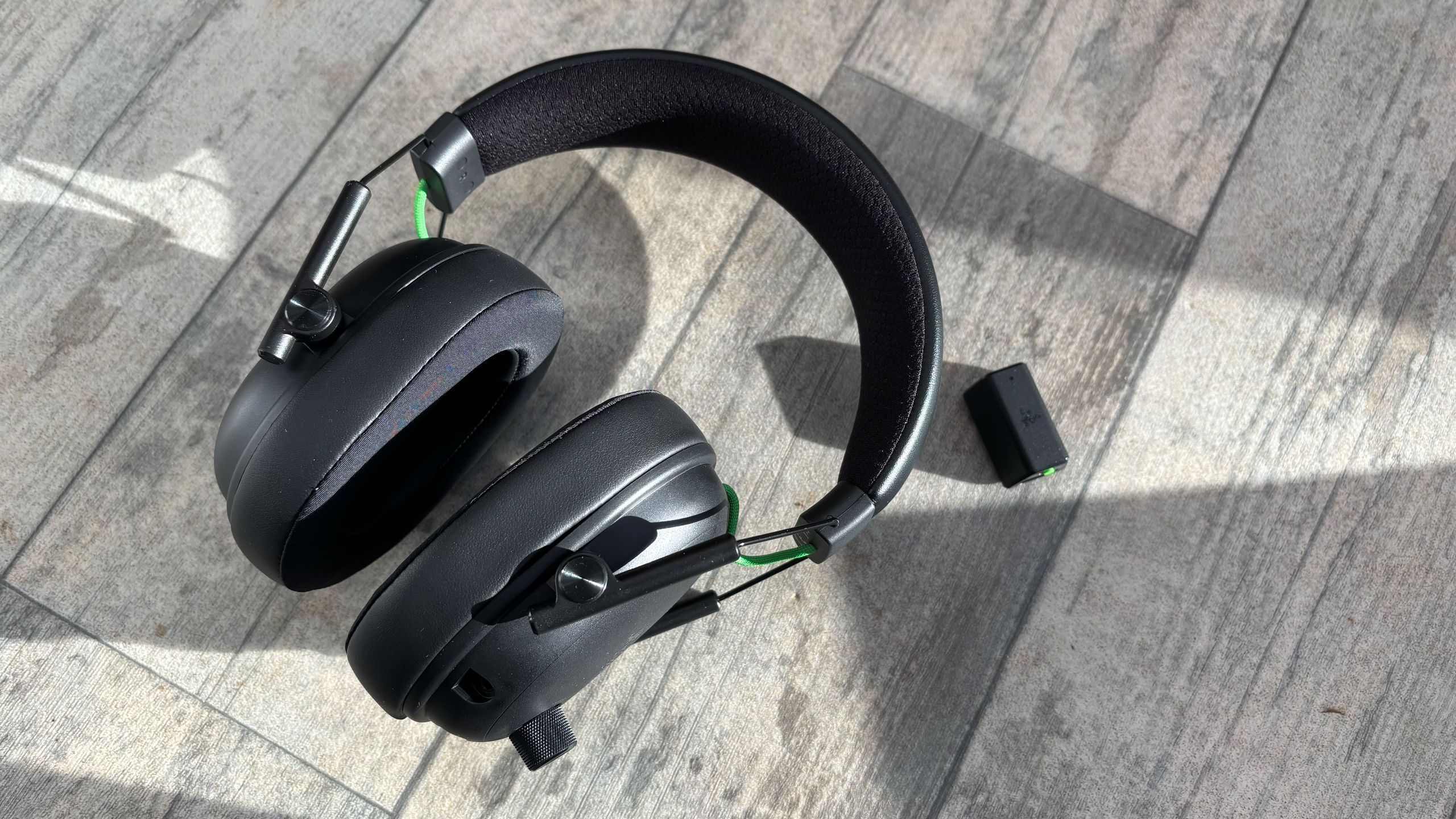
The Razer BlackShark V3 wireless gaming headset looks practically identical to the other Razer BlackShark V3 sets: the V3 Pro and the V3 X HyperSpeed. It’s got a sleek black design with subtle Razer branding on the earcups and headband, which I appreciate since so many gaming headsets would take any opportunity to shove colours and logos in your face, which is somewhere I found the Astro A20 X fell short, since its design verged on slightly too in-your-face. But it doesn’t need an interesting or quirky design to be a good product. In fact, it’s a perfect example of something being so simple yet so incredibly satisfying.

Both the headband and the earcups have firm cushioning and padding, and aren’t made of that horrible glossy material a lot of cheaper headsets use, similar to a headset like the SteelSeries Arctis Nova 5, which boasts a similar build quality and black design. The headband used a breathable, almost netted fabric, and each earcup is made from breathable Sportsweave memory foam. Since the headset almost prides itself on being for esports, these elements have clearly been carefully designed to cater to being comfortable for competitive players. But for more casual gamers like me, they just feel like a nice treat.
Despite the firmness of the cushioning on both the headband and earcups, I was surprised at how comfortable they were in use. Usually, firmer earcups make wearing glasses when gaming uncomfortable as they push the arms into the side of your head, so I was shocked when I never experienced this discomfort.
All the controls you need are located on the ear cups too, which reduces the need for external software if you don’t fancy downloading, with the left featuring all the important buttons like a textured power button alongside a smooth mic mute, so there’s no chance of pressing the wrong thing when wearing the set.

In addition, a dial on the front of the ear cup is where you control your audio level, which is far easier to use than a scroll wheel on the bottom – something that most of the headsets I’ve used in the past specialise in. Now that I’ve had the convenience of a larger dial, I never want to go back to relying on these wheels, which are so easily knocked and altered.
The left cup is specifically for optimising your audio setup to suit what you’re playing. Here, you’ve got a configurable roller which you can use for footsteps scaling in games like Battlefield 6 or Arc Raiders, game-chat balancing so you can sort out your game audio and Discord audio without having to open your audio mixer, and mic monitoring. This convenient wheel is accompanied by a smart switch button, too, in case you need to change your connection in an instant. Basically, the entire headset has been designed to make your life a lot easier and give you more game time rather than wasting precious minutes on sorting your peripherals.

The mic plugs into the right ear cup, too, which in itself boasts a sturdy build quality and matches the same sleek black design of the rest of the headset. If I had one complaint, it would be that the size of the foam cover is quite large, and it does feel pretty invasive given the short length of the mic as a whole.
That, and you can’t conveniently store the microphone on or around the headset if you don’t want to use the mic – you’re at the mercy of your own ability to keep it safe when unplugged. Again, if you’re used to the convenience of a compact headset like the SteelSeries Arctis Nova 5, then this may be a frustration. But these are such minor inconveniences that were almost instantly outweighed by the joy of using the headset.
Razer BlackShark V3: Performance
- Seamless setup, which means you can jump straight into use
- Might as well be noise-cancelling
- Customisable to suit whatever sort of gamer you are, competitive or not
Given I’d been using the SteelSeries Arctis Nova Pro headset until now, which I really praised as my holy grail, I thought the audio quality of a cheaper headset wouldn’t be as impressive, and I couldn’t be more mistaken. In fact, it’s hard to express how impressive the sound quality of this mid-range headset really is without you hearing it for yourself.
The SteelSeries Arctis Nova Pro headset is by no means of bad quality. In fact, I was amazed by it when I first tested it and kept using it long after. However, I often found myself frustrated by all the wires that accompany it. After meeting the BlackShark V3, I feel as though I’ve got all the same sound quality as the Arctis Nova Pro with the satisfaction of a wireless headset.

From the second you set it up and start using the BlackShark V3, you’re met with rich, deep audio, whether that’s in-game or if you’re just listening to some tunes while you do something else. For music-oriented games like Sword of the Sea and Herdling, two games I played during my testing of the BlackShark V3, the clear audio and almost noise-cancelling capabilities (though not actually part of the design) helped me to really sink into the game and experience each and every note in their soundtracks.
Even just watching YouTube videos or listening to in-game dialogue feels more intense, especially given the headset’s ability to block out external audio without being completely noise-cancelling. The memory foam earcups really help in this regard, and they really help you from getting distracted by any noise around you.
This is also helped by the almost 70-hour battery life when fully charged, since you’re rarely interrupted by those tedious beeps that remind you to plug it in. Battery life is a huge selling point with wireless headsets, which is another place the SteelSeries Arctis Nova 5, or any SteelSeries headset for that matter, becomes a close competitor with the BlackShark V3. If you do find yourself listening to these obnoxious reminders, what makes the Razer BlackShark V3 wireless headset worth investing in alone is the fact that a 15-minute charge provides you with an additional 6 hours of battery life.

You don’t need to do any sort of additional setup to get an incredibly solid performance from the headset, though the option is there if you want it, courtesy of the additional Razer Audio software you can download. I don’t usually bother with messing around with many settings, especially since I don’t often find myself needing to enhance my audio to hear things like footsteps or distant gunshots, but it felt rude not to at least try it out in a game of Arc Raiders.
So, I downloaded the Razer Audio app and started playing around, and was once again pleasantly surprised with how easy it was to take your audio customisation that one step further. Paired with the configurable wheel, it feels as if the Razer BlackShark V3 headset really has been designed to enhance your gaming. Even though the packaging blatantly says it’s an esports headset, all these details and ways to make your gaming experience that little bit easier by utilising all the audio cues of other players certainly reinforce that factor.
Although you can use Razer Synapse to customise things like your EQ settings and play around with THX Spatial Audio, the dedicated audio app definitely feels easier to use. Plus, having it conveniently on your phone rather than a desktop means you can more seamlessly customise your settings across platforms rather than having one setup on PC, and then others programmed in the app for console.

The buttons are incredibly well-positioned on both earcups, too. Unless you’re a frequent connection switcher or a competitive gamer, you rarely need to use the left cup. And, the added texture on the power button makes using the buttons a breeze rather than having to go through that awkward fiddly phase of hitting the wrong thing when you change your headset, and you’re not quite used to where everything is. Yes, I’m definitely projecting, but it’s one of those little things that you don’t really appreciate until you experience it.
Its impressive performance doesn’t stop at its stellar button placement and crystal clear audio either. The 9.9mm HyperClear Super Wideband detachable mic offers astounding quality given its mid-range price tag, so much so that I actually received compliments on the “noticeable upgrade” compared to my old headset when jumping into a Discord call with my friends.
Should I buy the Razer BlackShark V3?
Buy it if…
Don’t buy it if…
Also consider…
Still not sold on the Razer BlackShark V3 wireless gaming headset? Here’s how it compares to two similar sets.
| Row 0 – Cell 0 |
Razer BlackShark V3 wireless |
Astro A20 X |
SteelSeries Arctis Nova 5 |
|
Price |
$149.99 / £149.99 / AU$350 |
$179.99 / £169.99 / AU$349.99 |
$129.99 / £129.99 / AU$139.95 |
|
Weight |
9.5oz / 270g |
10.23oz / 290g |
9.5oz / 266g |
|
Compatibility |
PS5, Xbox Series X|S, Xbox One, Nintendo Switch, PC, Mobile |
PS5, PS4, Nintendo Switch, Nintendo Switch 2, PC, Android, iOS |
PS5, PS4, Xbox Series X|S, Xbox One, Nintendo Switch, PC, Mac, Mobile |
|
Connection type |
2.4 GHz Wireless / USB Wired / Bluetooth |
Bluetooth / Lightspeed Wireless / Wired USB-C |
Wireless (2.4GHz via dongle), Wired (USB-C), Bluetooth 5.3 |
|
Battery life |
Up to 70 hours |
40 hrs (default lighting), 90hrs (RGB off) |
Up to 60 hours |
|
Features |
THX Spatial Audio, detachable Razer HyperClear Super Wideband 9.9mm mic, |
Detachable 48kHz / 16 bit omni microphone, Lightsync RGB, Playsync Base |
360-degree spatial audio, retractable ClearCast 2.X mic |
|
Software |
Razer Audio |
Logitech G Hub (PC) / Logitech G app (mobile) |
SteelSeries Arctis Nova 5 Companion App (mobile), SteelSeries GG |
How I tested the Razer BlackShark V3
- Compared with my beloved SteelSeries Arctis Nova Pro headset
- Used every day for gaming and other media
- Mic tested in Discord calls and Google meets
As soon as I realised just how quality the BlackShark V3 was, I ditched my old SteelSeries Arctis Nova Pro headset. So, for two weeks, I’ve relied on this bit of kit to carry me through all sorts of adventures in games like Sword of the Sea, Once Upon a Katamari, and even made the most of its customization in a couple of rounds in Arc Raiders. Outside of gaming, it’s also accompanied me for hours upon hours of Spotify sessions and the odd evening watching Netflix. If anything, these almost all-nighters definitely put the battery life to the test, too.
I also spent around 10 hours testing the BlackShark V3 with the PS5 in a decent session of Red Dead Redemption 2. I will admit, I wasn’t jumping in for the fast, gunslinging combat, so I can’t comment on how immersive that is. But, I must say the BlackShark V3 is phenomenal when it comes to showing off the natural sound design. Birdsong is clear as day with this headset, and I could’ve quite happily spent a lot longer riding around on my horse and tracking down every bird I could hear – something that I’d missed out on entirely when just relying on my TV’s default speakers.
To test the microphone, I used the BlackShark V3 for meetings, voice calls, and multiplayer games like Peak, R.E.P.O., Outlast Trials, and shouting at my friends over Discord. Although I’d already put my old SteelSeries headset to one side, I did dust it off for a quick comparison, alongside my wireless Razer Kraken Hello Kitty and Friends edition Bluetooth headset, and they just don’t compare.
First reviewed December 2025-January 2026.
Read more about how we test